Green rocks: how to narrow down what you found
Green is a starting clue, not an identification. A green specimen may be an individual mineral, a rock containing green minerals, or a fine-grained rock whose ingredients are too small to distinguish by eye. Begin by describing its texture and structure before choosing a name.
In this guide
First decide what you are looking at
Check whether the green material is the whole sample, individual grains within it, or only a surface coating. Then ask whether you can see distinct crystals, tiny grains, or thin layers.
Photograph the dry specimen in daylight against a neutral background. Take a second image close enough to show the texture. Keep the lighting consistent: a strong color cast makes comparisons less useful.
 ROCK SCAN
Identify your rocks
Take a photo to explore a possible match.
iPhone and Android · In-app purchases
Four examples worth comparing
Olivine-bearing rock. The National Park Service describes olivine as a green, glassy mineral containing iron and magnesium. Olivine can occur as grains in basalt and other rocks. Seeing green grains does not mean that the whole rock should be named olivine.
Amphibole-bearing rock. Hornblende, a common amphibole, ranges from dark green to black. Amphibole crystals can have elongated, prismatic forms. Very dark material may need good lighting before any green tone is apparent.
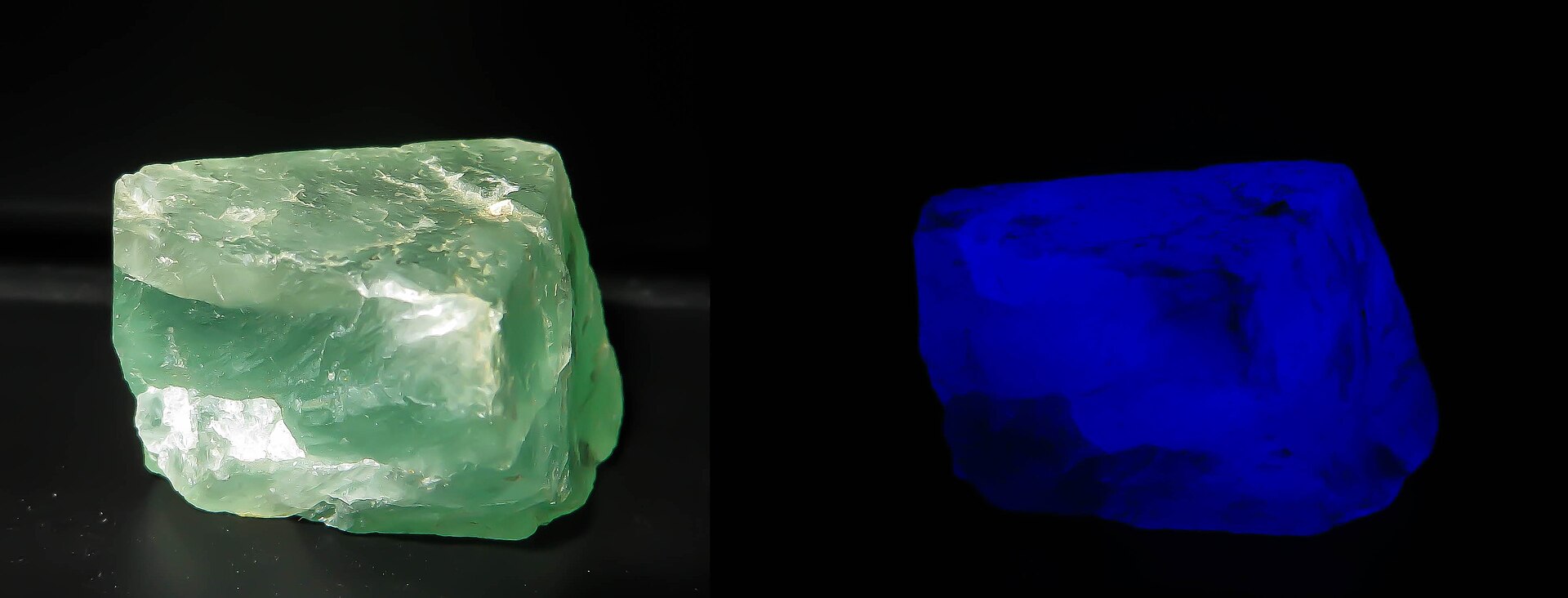
Fluorite. Fluorite occurs in several colors, including green. The paired photograph shows the same fluorite specimen in normal light on the left and UV light on the right. It illustrates why lighting belongs in an identification record; it does not mean every green crystal is fluorite. Color alone cannot distinguish it from other minerals. If purple areas are also present, our amethyst versus fluorite comparison explains additional features to examine.
Green shale. Not every green find is a prominent crystal. The Kentucky Geological Survey describes green to greenish-gray shales. Fine grain size and sheet-like splitting point toward a different identification path from a glassy crystal.
These examples are a short comparison set, not a complete catalog of green minerals.
Build a description before using an identifier
Record three or four observations in plain language: “dark green grains in a black rock,” “translucent green crystal,” or “dull greenish-gray flakes” are useful starting descriptions. Include the specimen's size and where you found it, if known.
Look for combinations that agree. Green color with a glassy appearance suggests different candidates from green color with a fine, dull, layered texture. If the observations conflict with a suggested name, keep the identification tentative.
Do not use color to infer a gemstone's value or a collectible's authenticity. A polished surface can hide features that would otherwise help. For material with no reliable origin, a local geological collection or qualified specialist may provide a better comparison than another color photograph.
Keep the whole rock and its grains separate
The name of a green mineral is not automatically the name of the surrounding rock. The rock versus mineral guide explains how to keep those two identification questions separate. Our quartz versus calcite guide offers another example of comparing mineral properties instead of relying on appearance alone.
Compare a photo with these clues
If the specimen contains several kinds of grains, start with rock vs. mineral. Use the rock and mineral comparisons to choose a closer match based on the features you can see.
Try Stone Identifier on iPhone or Android for a photo-based starting point, then compare the suggestion with the visible features described here. A photo suggestion is not a conclusive specimen test.
For two green metamorphic rocks, compare the documented serpentinite and greenstone specimens.
Sources
ROCK SCANIdentify your rocks
Take a photo to explore a possible match.
iPhone and Android · In-app purchases